The Desktop Toolbar

This area contains shortcuts to some of the more common functions in payroll.
| Button | This button is used to: |
|---|---|
|
Home Page |
Open the HR3 web site, www.HR3.com.au. Here you can take a product tour, order stationery and download payroll guides or the latest tax scales. |

Navigator |
Bring the navigator window to the front of your screen. You can also press the F2 key at any time. |
|
Company |
This accesses the ‘Maintain company details’ screen. |
|
Payrun |
This activates the Payrun Wizard. |
|
Payroll Framework |
Click this button to display the Payroll Framework items within the navigator. |
|
Favourites |
Open a drop down list of your favourites folders, and any items you have saved there. Select the item you wish to open from the list. |
|
Reports |
Open the Report Explorer window. |
|
Data Explorer |
Open the Data Explorer window. |
|
ToDo |
Open the Tasks window. |
|
Help |
Open the Help files so that you can get assistance with a task or information about a function. |
|
|
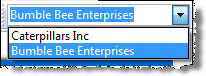
Select and open a particular company if there is more than one in your database. This field shows the name of the company. If there is more than one company within your database, use this list to change to another company. |